
Recipe Keeper
Tudorspan LimitedFood & Drink
4.73.76K Reviews
- Version
- 3.46.1.0
- Installs
- 1.00M
- Age Rating
- Everyone
Screenshots
Our Review of Recipe Keeper
 Analysis by Appyee
When a recipe is split between a screenshot, a handwritten card, and a half-remembered note, deciding what to cook can become more work than cooking. I like the idea of having those sources in one place, but the useful test is whether an app helps me find a recipe and turn it into a workable meal without adding another chore. Recipe Keeper is built around that everyday problem, combining a recipe collection with planning and shopping tools.
Recipe Keeper is a free Food & Drink app from Tudorspan Limited. It has a 4.7 average from around 18,000 ratings, and more than a million installs. It’s rated for Everyone, with a current version of 3.45.1.0 and Android support from version 5.1. Those figures suggest a well-established option, though popularity alone can’t tell you whether its way of organizing recipes suits your habits. In my view, it makes the most sense if you want a personal collection that can support the whole path from choosing a dish to buying ingredients.
Getting Started with Recipe Keeper
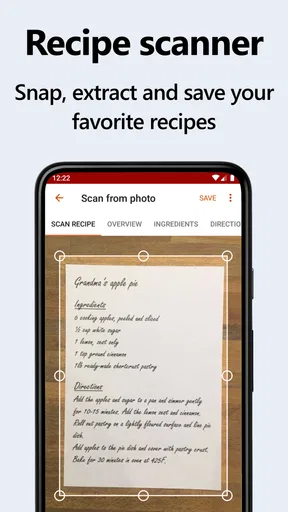
Installing Recipe Keeper is as easy as pie. It’s available on both Android and iOS, making it super accessible. Once downloaded, the setup is pretty straightforward. The app welcomes you with a neat interface that’s easy to navigate. You can start adding your recipes right away, either by typing them in manually or by snapping a photo of a recipe from your favorite cookbook. The app does a pretty good job of recognizing text from images, which is a lifesaver for the more, shall we say, "rustic" handwriting styles out there.
Where setup can snag
Even a friendly interface can’t make every recipe source equally easy to bring in. A clean, printed page and a faint, cramped handwritten card are very different recognition jobs, so I’d treat a captured recipe as a draft to check rather than assume every word landed perfectly. Pay particular attention to ingredient amounts, unusual abbreviations, oven temperatures, and steps where a misplaced word changes the result. The time saved on typing is real only if you catch errors before you cook.
For a first session, I’d add one recipe you already know well instead of importing a whole pile at once. That gives you a quick way to check whether the ingredients and instructions are easy to scan on your device, and it helps you settle on categories and tags before the collection gets large. If an online recipe doesn’t import cleanly, entering its essential ingredients and method manually is a sensible fallback; it’s better to have a readable version than to keep troubleshooting one page while dinner waits.
Organizing Like a Pro
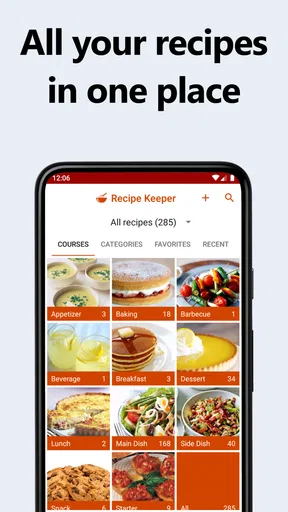
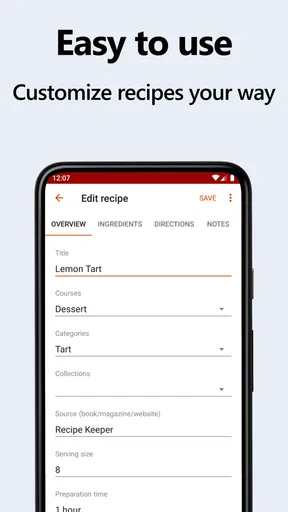
One of my favorite features of Recipe Keeper is how it lets you organize your recipes. You can create categories like "Desserts," "Main Courses," or even something cheeky like "Lazy Sunday Brunches." The app allows you to tag recipes with ingredients, making it super easy to find something to cook based on what you have in your pantry. No more last-minute grocery runs, thank you very much!
There’s a small but useful distinction between categories and ingredient tags: categories help answer what kind of dish you want, while ingredient tags can help narrow the choice to what is already in the kitchen. I’d use a few broad categories and consistent ingredient names rather than inventing a new label every time. That modest bit of discipline pays off later, especially when you remember a dish by its main ingredient but not by the title you gave it.
Sharing and Caring
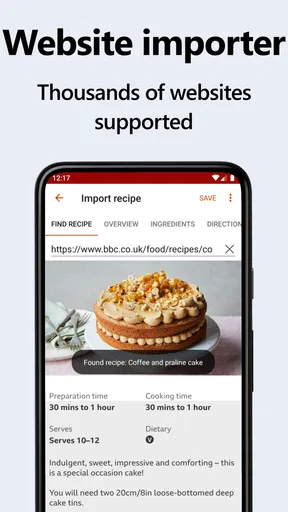
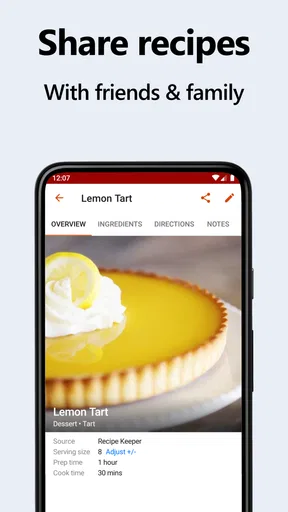
Now, what’s a good recipe if you can’t share it with friends and family? Recipe Keeper makes sharing a breeze. You can export your recipes to share through email or social media. Plus, it supports importing recipes from popular websites, so you can bring all your digital favorites into one place. I found this particularly useful for those spontaneous "this looks delicious" moments when browsing online.
Importing and exporting are handy bridges, but I wouldn’t make them a reason to stop keeping a clean master copy in the app. After importing a webpage, I’d check whether the method still makes sense when separated from the original page, then add any personal adjustment as a note. Before sharing a recipe, it’s also worth checking that the version you send includes the details another cook needs: quantities, preparation steps, and any change you made after trying it. That makes the collection more useful as a family recipe book, not just a box of links.
Meal Planning Made Easy
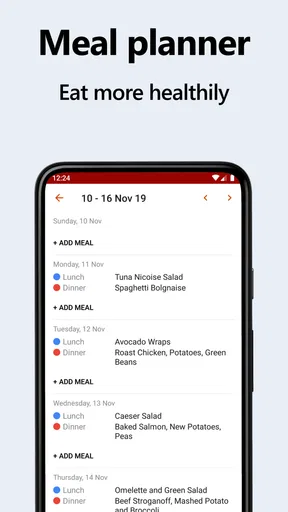
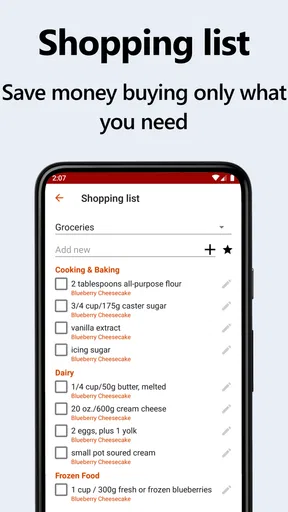
If you’re into meal planning, the app has got you covered. You can schedule meals for the week, which is a game-changer for staying organized and avoiding the dreaded "what’s for dinner?" question. The shopping list feature is another gem. You can add ingredients directly from your recipes to your shopping list, and it even organizes them by department. It’s like having your own personal grocery assistant!
A realistic way to use this is to plan only a few dinners at first, especially if your week tends to change. Pick dishes that share ingredients, add what you need to the list, and check your cupboards before heading out. That last check matters: a recipe list can tell you what its ingredients are, but you still need to account for what you already own and any substitutions you prefer. For a household where one person shops and another cooks, the planned meals can also make the intended use of each ingredient clearer.
I wouldn’t treat a weekly plan as a contract. If a late meeting or a change of appetite disrupts the schedule, move your attention to what will spoil soon and choose a recipe that uses it. The app is most helpful when it reduces decisions, not when it makes you feel obliged to follow a perfect calendar. And if you only cook occasionally, planning two meals may be more useful than filling every day just to use the feature.
Cloud Sync and Backup
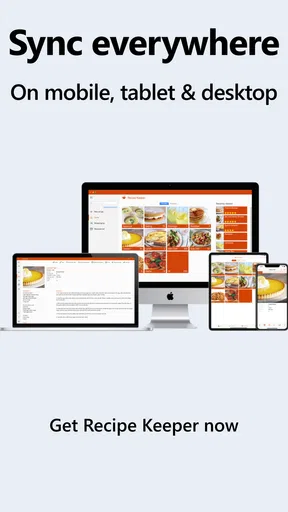
One of the things that really stood out to me is the cloud sync feature. You can access your recipes across multiple devices, which is perfect for when you’re cooking at a friend’s house or using a tablet in the kitchen. Plus, it automatically backs up your data, so you never have to worry about losing your precious recipes.
Sync is most valuable when the same collection needs to be available in more than one place, but I’d still check that a recipe added on one device appears on another before relying on it during a busy cooking session. If a change seems missing, first make sure both devices are connected and give them a moment to catch up; then reopen the collection and check which copy contains the latest edit. Avoid making several conflicting changes on different devices while you’re trying to resolve a delay. That simple habit helps distinguish a temporary sync pause from a recipe that was never saved as expected.
When the app may not be the problem
Some frustrations come from the source material rather than the organizer. A website can change its layout, a photo can be difficult to read, and an old recipe card can leave out steps that were obvious to the person who wrote it. If imported text looks incomplete, compare it with the original before blaming the collection or repeating the import. For a recipe you cook often, a careful manual correction and a note about what worked can be quicker than trying to make imperfect source text behave like a polished cookbook.
There’s also a practical limit to ingredient-based searching: it works best when your saved recipes have useful, consistent ingredient information. If you’ve only saved a title or a link, the app can’t make that entry as actionable as a fully recorded recipe. I’d gradually improve the dishes I actually cook instead of spending an evening perfecting every old bookmark. That keeps the tool useful without turning recipe management into its own hobby.
Who will get the most from it
I’d recommend it to home cooks who collect recipes from several places and want those recipes to feed into planning and shopping. It’s especially appealing if you like adapting dishes, saving notes, or sharing a dependable version with relatives. Someone who cooks from a small, fixed set of recipes can still benefit, but a notebook or a basic notes app may be quicker if they don’t need tags, imports, or a connected shopping routine.
Compared with a general notes app, Recipe Keeper is more deliberately organized around cooking: recipes are meant to be found, planned, and used for shopping rather than buried among reminders and unrelated notes. Compared with browsing recipe websites every time you cook, a saved collection is easier to personalize and revisit, although websites remain better when you want fresh inspiration and context around a dish. If you prefer a printed cookbook, dislike maintaining digital collections, or want an app to decide your meals for you, this may not be the right fit. Its value depends on adding and maintaining recipes, not on replacing your judgment in the kitchen.
User-Friendly Experience
Overall, the user experience is smooth and intuitive. The app is designed with the user in mind, making it easy to navigate even for the less tech-savvy among us. I appreciate the little touches, like being able to add cooking tips or notes to recipes, which can be super helpful when trying to replicate grandma’s secret sauce.
Those notes are more than decoration when they capture a detail that would otherwise be forgotten: whether a dish needed more time, what substitution worked, or which step should be done ahead. I’d keep them short and tied to an actual cooking result. That way, the next time you open the recipe, the useful lesson is easy to spot rather than lost in a long personal diary.
The app is free to download, with in-app purchases listed at $19.99 per item, so I’d look at the available purchase details in the app before assuming every option is included at no cost. The main collection workflow is straightforward enough to try with a few recipes first. If the way you cook naturally leads you to use planning, shopping, and cross-device access, you’ll have a clearer sense of whether paying for any additional item makes sense for you.
In conclusion, Recipe Keeper is more than just a digital cookbook; it’s a comprehensive tool that makes managing, sharing, and organizing recipes simple and fun. Whether you’re a seasoned chef or just starting out, this app can help streamline your cooking endeavors and maybe even inspire some culinary creativity. So go ahead, give it a try, and happy cooking!
My practical verdict
I’d start with a handful of recipes that already matter to you: one from a book, one from a website, and one you know by heart. Check the captured text, add a note where your own method differs, then try planning a meal and building its shopping list. That small trial will show whether the organizing style fits you far better than installing it and immediately importing everything you’ve ever saved.
For me, the strongest reason to choose Recipe Keeper is the connection between a personal recipe collection and the practical work around it. Its trade-off is that the collection becomes valuable through a little care: checking imports, using tags consistently, and keeping details current. If that sounds manageable, it can make the path from “I want to cook that” to “I have what I need” noticeably calmer. If you’d rather keep recipes on paper or rarely cook from saved dishes, a simpler approach may suit you better.
Verdict
Strengths of Recipe Keeper
- User-friendly interface with intuitive navigation.
- Supports importing recipes from websites easily.
- Customizable categories for better organization.
- Grocery list feature syncs across devices.
- Offline access to saved recipes.
Limitations of Recipe Keeper
- Limited free version features.
- No integration with voice assistants.
- Occasional sync issues between devices.
- Ads can be intrusive in free version.
- Recipe sharing options are limited.
Similar Picks in This Category
View All
Rappi: Food Delivery, Grocery
Rappi, Inc - Delivery3.5

McDonald’s: Cupons e Delivery
Arcos Dorados4.3

Swiggy: Food Instamart Dineout
Swiggy4.7

Blinkit: Groceries & more
Blinkit4.8

foodpanda: food & groceries
Foodpanda GmbH a subsidiary of Delivery Hero SE4.0

Zomato: Food Delivery & Dining
Zomato4.7
Frequently Asked Questions
What platforms is Recipe Keeper available on?
Recipe Keeper is available on both Android and iOS platforms, making it accessible for a wide range of devices. Additionally, it offers a desktop version for Windows and Mac, allowing users to seamlessly sync their recipes across all their devices. This cross-platform availability ensures that you can access your recipes anytime, anywhere.
Can I import recipes from other sources into Recipe Keeper?
Yes, Recipe Keeper allows you to import recipes from websites and other digital sources. The app features a web clipper that lets you easily capture recipes directly from your browser, streamlining the process of adding new recipes to your collection. This feature helps you consolidate all your favorite recipes in one place.
Does Recipe Keeper offer meal planning and shopping list features?
Absolutely. Recipe Keeper includes intuitive meal planning and shopping list features. You can plan your meals for the week and automatically generate shopping lists based on the recipes you select. This functionality helps you stay organized and ensures you have all the ingredients you need, reducing the hassle of last-minute shopping trips.
Is it possible to share recipes with friends and family?
Yes, Recipe Keeper allows you to share your recipes with friends and family easily. You can send recipes via email or social media, or even print them out. This sharing capability makes it simple to exchange culinary ideas and collaborate on meal planning with others, enhancing the social aspect of cooking.
Are there customization options available in Recipe Keeper?
Recipe Keeper offers a variety of customization options to suit your preferences. You can organize recipes by category, add personal notes, and even adjust serving sizes. These features allow you to tailor the app to fit your cooking style, making it a personalized and efficient tool for managing your culinary creations.
